A player that is always there
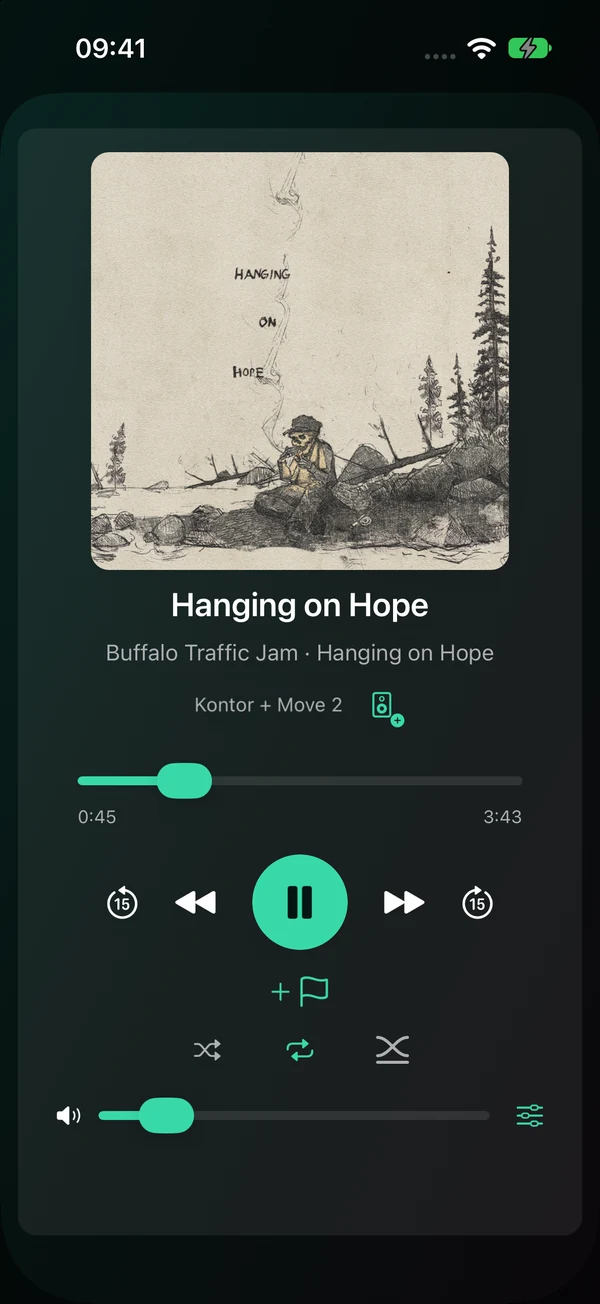
What is playing sits at the bottom of every screen, and opens into a full Now Playing view.
Moments, cue points and your own favourites, wherever you are in the house — and at a friend's.
Everything on the Features page, shaped for a phone.
What is playing sits at the bottom of every screen, and opens into a full Now Playing view.
Moments, Browse, the queue and cue points each have a tab of their own.
Send your cue points with the share sheet, and bring in cue sheets from the Files app.
Tap a control that cannot be used right now, and the app says why.
The top of every screen shows how many rooms are playing together. A portable speaker's battery shows under its name, with a mark while it charges. Tap the speakers button in Now Playing to add a room to the group or take one out — Sonopley asks first if a room you add is playing something else.
Switch on simple mode in App settings and the phone shows big tiles for your moments and a few large buttons, in plain words that grow with your text size. More on the Features page.
Sonopley for iPhone is free to download, with 30 days of everything. After that, one purchase unlocks it for good — no subscription.
Without the purchase the remote keeps working, free: rooms and groups, playing and volume, Browse, the queue, your music services, the EQ and cue points.
The purchase adds Moments and simple mode, Sonopley favourites, alarms and the sleep timer, the other themes, and speakers on a network of their own, such as an IoT VLAN. Whatever comes later is included, and Family Sharing is on.
The launch price goes up with the first big update, so buying early costs less.
To find your speakers, Sonopley needs iOS's permission to look on your local network. The first time you open it, iOS asks, in Sonopley's words: “Sonopley finds and controls the Sonos speakers on your network.”
Sonopley looks only for Sonos speakers, and talks only to them. If you said no, turn it on in Settings, under Privacy & Security, Local Network.
Everything else is on the Features page. The app is being tested now; this page will link to the App Store when it is there.